Composing a computer environment
Create your own CUA environment from an OS, a driver, and computer applications
A computer env is one env.toml in a bundle. This page composes an office desktop: Ubuntu 24.04,
trycua's cua-driver, the libreoffice app from Creating your own computer app
environment and the shipped chromium browser. A Mac on
Aside follows it.
Copy the desktop bundle's folder, which agent-env run lists, add envs/libreoffice, and run
the copy:
cp -r <desktop's folder> office
agent-env run ./office --task probe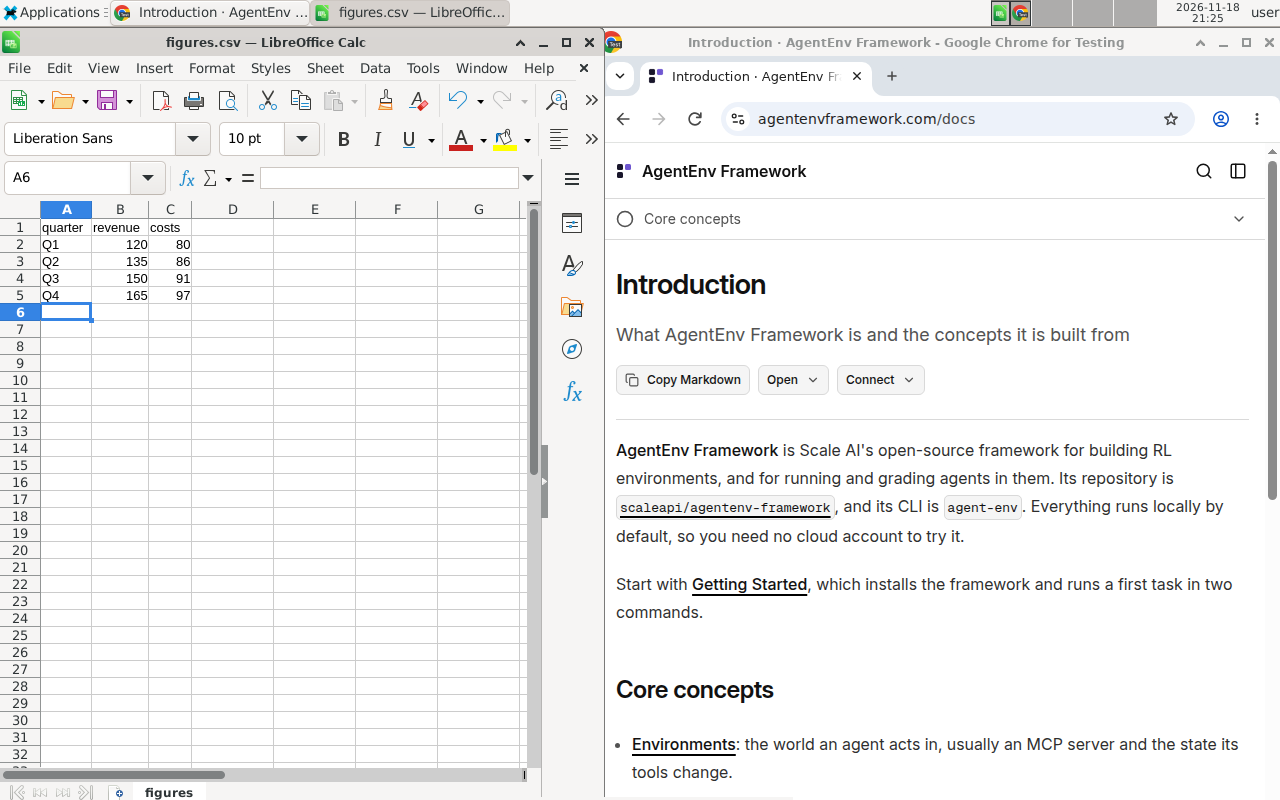
The office desktop as computer_screenshot returns it, from a real run, its windows set side by
side.
The parts
type = "computer"
computer = "ubuntu-24.04"
driver = "cua-driver"
apps = [
    { env = "libreoffice", settings = { open = "figures.csv" } },
    { env = "chromium", settings = { start_urls = ["https://www.agentenvframework.com/docs"] } },
]| Part | Key | In the office desktop |
|---|---|---|
| Base computer | computer | ubuntu-24.04, Ubuntu 24.04 with XFCE |
| Driver | driver | cua-driver, which serves the screen over MCP |
| Apps | apps | libreoffice, a folder of this bundle, and chromium, the shipped browser |

A part is named by an installed alias, a folder of the bundle, an id, or a table that pins a
version, such as driver = { env = "<id>", version = 1 }. The env deploys with no gateway: the
driver's card is the env's card, named after the folder, desktop.
On macOS
type = "computer"
computer = "macos-26"
driver = "aside"
At Inc.'s aside
drives the apps macOS comes with. The driver setting allowed_apps limits which it may open, as
Deploy it shows. This env composes only on an Apple-silicon Mac with
Lume.
Keys
| Key | Default | Meaning |
|---|---|---|
type | required | "computer" |
computer | required | The base computer |
driver | required | The driver, exactly one |
apps | none | The apps built into the computer. Apps |
display | the base's resolution | The screen size. Screen, network and tools |
network | unset: everything allowed | The computer's egress |
tools | "both" | Which tools agents get |
computer_settings | the base's defaults | The base's settings by name, such as { timezone = "America/Chicago" } |
environment_name | the folder's name | The name the card is served under |
id | from the bundle and folder | An id of its own, under @local/ |
Any other key, or a value of the wrong type, is refused before anything is written.
Apps
An entry is an app's name, or a table of the app as env with its settings. Those override the
app's own [settings], and a deploy's app_settings overrides them again. A version pins the
app.
An app that doesn't fit is refused, such as one that supports no platform the base is, uses the
driver's port, or is listed twice. The computer's /dev/shm is the most any app asks for:
chromium asks for 1024 MiB.
envs/libreoffice/env.toml names a computer and a driver, so the app can deploy
alone and writing it composes that computer
too.
Screen, network and tools
| Key | Takes |
|---|---|
display | { width, height }, 1 to 32767 pixels each |
network | { mode = "allow_all" }, or { mode = "allowlist", allow_hosts = [...], allow_cidrs = [...] }; an empty allowlist closes it |
tools | "standard", the computer_* tools alone; "driver", the driver's own alone; "both" |
No deploy changes these. Local Docker enforces only everything or nothing; Sandboxes says which providers take an allowlist.
What happens when you write it
agent-env run and agent-env bundle register write the env before any task starts. A
--dry-run checks keys and types, not whether the parts fit. Writing it runs these stages:
On an empty store, the first run composes the apps' own computers, then the desktop:
envs/desktop: composing container/amd64, container/arm64 on LocalSandboxProvider
envs/desktop: container/amd64: building natively with this machine's Docker
envs/desktop: container/arm64: failed at resolve: this machine can't build linux/arm64: its Docker has no emulation for it (0 s)
envs/desktop: container/amd64: resolving packages
envs/desktop: container/amd64: resolved 132 files and stored them
envs/desktop: container/amd64: building the image
envs/desktop: container/amd64: comparing the files its parts' run scripts and install steps wrote
envs/desktop: container/amd64: pushing the image
envs/desktop: container/amd64: probing on LocalSandboxProvider
envs/desktop: container/amd64: ready (2 min 42 s)
envs/desktop: v1 (new)
That run, probe included, took 329 seconds on an 8-core machine. Changing an app's files recomposes it and the desktop, about 3.5 minutes here; an unchanged env composes nothing.
local builds the other architecture under emulation, 10 to 20 times slower, and --no-emulate
skips it. This Docker couldn't emulate, so arm64 failed; later runs try it again.
agent-env run builds only the forms its deploys boot; bundle register and env build build
every form. Composing runs on [sandbox] default, this machine's Docker unless you set one.
Build statuses
| Status | Means | Deploys |
|---|---|---|
ready | Built and probed | yes |
unverified | Built, not probed: nothing here runs it natively | a disk or VM bundle, probed at its first native boot |
failed | A stage failed, with the reason | no |
skipped | Not built, as with --no-emulate | no |
A build that an agent-env with other composing code recorded shows , by another composer, and is
composed again.
Build it ahead of a run
agent-env env build composes every form and arch of a written env that isn't built yet. A folder
under your home takes ids under @local/~/, so ~/office writes:
agent-env env build --id @local/~/office/desktop --no-emulate| Option | Meaning |
|---|---|
--id | The computer env's id. Required |
--version | Its version; the latest by default |
--sandbox | The provider that builds and probes, by default the env's |
--no-emulate | Skip an arch no link runs natively |
It prints one <form>/<arch>: <status> line per build and exits 1 when one failed. A deploy with no
build it can boot is refused, naming this command.
Deploy it
A task deploys a computer env with a deploy_env step:
[
  {"id": "env", "type": "deploy_env", "env_id": "desktop"},
  {"id": "probe", "type": "env_outcome_verifier", "env_id": "desktop", "file_artifact_id": "check_probe",
   "verifier_id": "probe"}
]
env_params changes one deploy. On the Mac, it names the apps aside may open:
{"id": "env", "type": "deploy_env", "env_id": "mac",
"env_params": {"driver_settings": {"allowed_apps": ["TextEdit"]}}}| Field | Default | Meaning |
|---|---|---|
form | the first its sandbox runs | Boot this form alone: container, disk or vm_bundle |
computer_settings | the env's | The base's deploy-phase settings, such as timezone; a secret only as a secret: or env: reference |
driver_settings | the driver's | The driver's settings, set only here |
app_settings | the env's | Each app's settings, by app name |
site_routing | false | Reach the run's websites by their own names |
Every value is checked before anything boots. In a multi
env, they go under
child_envs.<computer>.env_params. The step's other fields work as for any env, minus those for a
gateway or state store.
Where it boots
A deploy boots the first build, in the order container, disk, vm_bundle, that its provider
runs natively. When none fits, it is refused before anything boots.
| Provider | Container | Disk | VM bundle |
|---|---|---|---|
local | this machine's platform | none | none |
local with KVM | this machine's platform | this machine's platform, and Windows on amd64 | none |
modal_vm | linux/amd64, from a store Modal reaches | Linux and Windows, amd64 | none |
lume | none | none | macos/arm64 |


With the default local stores, Modal can't pull from this machine's registry, so on modal_vm the
desktop boots its disk, composed here. On a Mac, set lume as the env default in the config, since
--sandbox lume would move the agents too:
[sandbox]
default = "lume"Warning: Local disks need Docker's overlay2 image store
On Docker's containerd image store, a disk composes but doesn't boot. Set
{"features": {"containerd-snapshotter": false}} in /etc/docker/daemon.json and restart Docker.
Use it
--keep holds the sandboxes up after the run and prints their endpoints, here for the office
task's rehearsal:
agent-env run ./office --task office-rehearsal --keepKept up:
tasks/office-rehearsal.json
local-3a3f719c local env @local/~/office/desktop
mcp http://127.0.0.1:<port>/mcp
expires 2026-11-18 23:24 UTC
folder ~/.agent-env-sandboxes/agent-env-local-3a3f719c-p9v_akae
Holding 1 sandbox up; Ctrl-C tears it down.mcp serves 73 tools: the seven computer_* tools and cua-driver's 66. The card is at
/.well-known/agent-env.json on the same address, with each app's card as a child. Agents reach
only those two; every other route takes a token minted for the deploy. In a task, deploy_agent
with env_ids hands an agent the endpoint.
Swap the driver
--set changes one env key for one run, and the files stay as written:
agent-env run ./office --task probe --set envs/desktop.driver=agent-desktop --dry-runagent-desktop → @local/agentenv-framework/drivers/agent-desktop (the alias agentenv-framework's drivers bundle gives it)
--set envs/desktop.driver=agent-desktop: 1 env and 1 task written under ids ending in (desktop.driver agent-desktop)It takes any env key, such as envs/desktop.tools=standard, and repeats, but can't set
env_params. A pair that can't compose passes the dry run and is refused when the run writes the
env.
Reset and tear down
A reset_env step ends the computer's recordings and boots it afresh on the same sandbox, at the
same address. Loaded files are gone, and an agent's MCP session starts again. A failed reset is
only logged unless the step sets fail_task_on_error.
Each run tears down its sandboxes as it ends, ending open recordings first. Ctrl-C does the same
and exits 130; a second Ctrl-C stops the teardown. A teardown_sandboxes
step tears down earlier.
Last updated on
Creating your own computer app environment
Create a computer app environment: the app environment is an atomic application that can run inside a CUA Environment
Example Tasks
Tasks on computer envs, from a probe that needs no model to an agent that edits a spreadsheet in LibreOffice and is checked from inside the computer