Creating your own computer app environment
Create a computer app environment: the app environment is an atomic application that can run inside a CUA Environment
A computer app is a computer_app env: software and its data, built into a computer's image beside
the driver. Its class, a ComputerAppEnvironment from the agentenv-framework-protocol package,
says how to install the app, launch it and find its data.
| MCP environment | Computer app | |
|---|---|---|
| The agent uses | its tools | its window, through the driver |
| It runs | in a container behind the gateway | inside a computer, beside the driver |
| It deploys | alone, or in a multi env | in a computer env's apps, or alone |
The app
This page writes libreoffice: Calc and Writer from Ubuntu's archive, with documents in ~/Office.
Composing puts it on an office desktop with
Chromium and cua-driver. The app is a folder of a bundle, here office. To start a bundle, copy
the shipped desktop one: agent-env run with no bundle prints where it lives.
env.toml        the env
libreoffice.py  the class
open.py         the launch
defaults.xcd    LibreOffice's defaults
skill.md        the skill for agents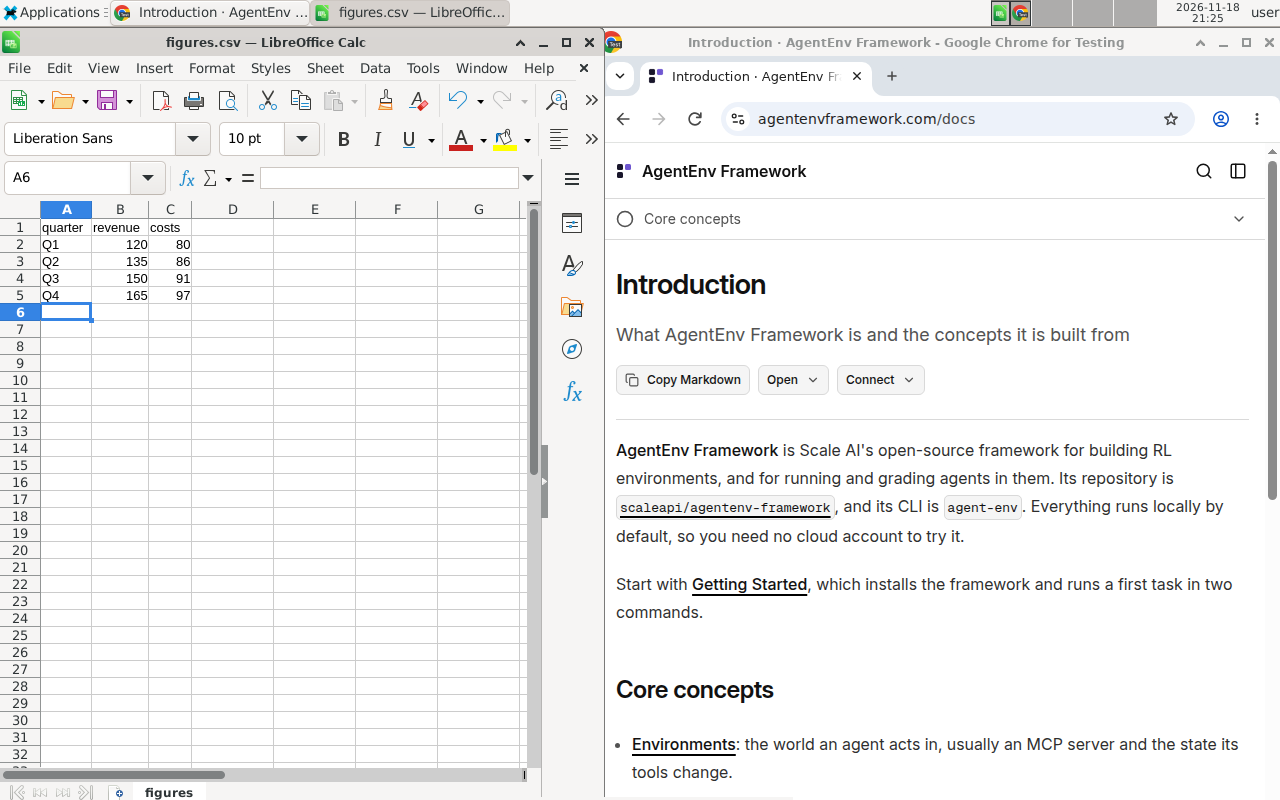
The office desktop from computer_screenshot, its windows set side by side, after a scripted run
typed the Q4 row.
Write it
"""LibreOffice Calc and Writer from Ubuntu's archive. It keeps its documents in ~/Office and opens the one its `open`
setting names when it launches."""
import shutil

from pydantic import BaseModel

from agentenv_protocol.computer import (ComputerAppEnvironment, Launch, Packages, Ready, computer_app, install_step,
                                        linux)

PACKAGES = ["libreoffice-calc", "libreoffice-writer", "libreoffice-gtk3", "libreoffice-style-colibre"]


@computer_app(supports=[{"os": {"type": "linux", "display": ["x11"]}, "arch": ["amd64", "arm64"]}])
@linux(packages=Packages(apt=PACKAGES),
       launch=Launch(command=["venv/bin/python", "open.py"], window={"instance": "libreoffice"},
                     ready=Ready(window=True, timeout_s=120)),
       paths=["Office"])
class LibreOffice(ComputerAppEnvironment):
    skill = "skill.md"

    class Settings(BaseModel):
        open: str = ""

    @install_step(scope="system")
    def defaults(self) -> None:
        shutil.copy("defaults.xcd", "/etc/libreoffice/registry/agentenv.xcd")
@computer_app names the platforms the app runs on. @linux says how a Linux computer installs and
launches it. Writing the bundle reads the class in a process of its own, so the app's dependencies
needn't be installed. An app that doesn't fit its computer is refused then, with every problem at
once.
type = "computer_app"
module = "libreoffice.py:LibreOffice"
computer = "ubuntu-24.04"
driver = "cua-driver"| Key | Default | Meaning |
|---|---|---|
type | required | "computer_app" |
module | required | The class, as "<file>:<class>" |
environment_name | the folder's name | Names its settings, data, skill and folder in the image |
computer, driver | none | The base and driver to deploy it alone on; both or neither |
settings | none | Defaults for its Settings |
build_settings | none | Values of its BuildSettings, fixed in the image |
Install it
@linux takes these fields. libreoffice uses packages, launch and paths.
| Field | Default | Meaning |
|---|---|---|
files | "." | The folder of the app's files copied into the image |
packages | none | Packages(apt=[...]): Ubuntu packages |
sources | none | AptSource(...): another apt repository and its key |
python | none | A requirements file for the app's venv |
downloads | none | Download(url=..., sha256=..., to=...) |
run | none | RunScript(script=...): a script run as root, or as the session user |
services | none | Service(name=..., command=...): programs the computer keeps running |
ports, shm_mb | none | Ports it listens on; shared memory it needs, in MiB |
launch, paths, skill | none | Launch it, the data plane, the skill |
settings, build_settings | none | Fields added to the class's on Linux |
Writing the bundle resolves every package in a container of the base,
stores each file in the object store by sha256 and lists them in a lock. The build installs only
the lock's files, offline. The app lands in /opt/agentenv/apps/libreoffice/, with a venv for its
own server, which the app may use too.
An @install_step method does what the fields can't. It runs at build, offline, as root, or as the
session user with scope="session". defaults installs this file, which turns off LibreOffice's
first-run screens, lock files, save-format question and document recovery:
<?xml version="1.0" encoding="UTF-8"?>
<oor:data xmlns:xs="http://www.w3.org/2001/XMLSchema" xmlns:xsi="http://www.w3.org/2001/XMLSchema-instance" xmlns:oor="http://openoffice.org/2001/registry">
<dependency file="main"/>
<oor:component-data oor:name="Common" oor:package="org.openoffice.Office">
 <node oor:name="Misc">
  <prop oor:name="ShowTipOfTheDay" oor:op="fuse"><value>false</value></prop>
  <prop oor:name="FirstRun" oor:op="fuse"><value>false</value></prop>
  <prop oor:name="UseLocking" oor:op="fuse"><value>false</value></prop>
  <prop oor:name="SymbolStyle" oor:op="fuse"><value>colibre</value></prop>
 </node>
 <node oor:name="Save"><node oor:name="Document"><prop oor:name="WarnAlienFormat" oor:op="fuse"><value>false</value></prop></node></node>
</oor:component-data>
<oor:component-data oor:name="Setup" oor:package="org.openoffice">
 <node oor:name="Product">
  <prop oor:name="ooSetupLastVersion" oor:op="fuse"><value>24.2</value></prop>
  <prop oor:name="LastTimeGetInvolvedShown" oor:op="fuse"><value>4102444800</value></prop>
  <prop oor:name="LastTimeDonateShown" oor:op="fuse"><value>4102444800</value></prop>
 </node>
</oor:component-data>
<oor:component-data oor:name="Recovery" oor:package="org.openoffice.Office">
 <node oor:name="RecoveryInfo"><prop oor:name="Enabled" oor:op="fuse"><value>false</value></prop></node>
</oor:component-data>
</oor:data>
Launch it
Launch runs command from the app's folder in the desktop session, at boot by default, or with
at="demand" when the agent opens it. window matches its window by X11 class, instance or
title. Ready waits for that window, a port or a command, within timeout_s: 60 seconds
unless set. A deploy waits until every app launched at boot is ready.
"""Start LibreOffice on the document its `open` setting names in ~/Office, or on a new spreadsheet."""
import os
from pathlib import Path

from libreoffice import LibreOffice

SOFFICE = "/usr/lib/libreoffice/program/soffice"
CSV = "--infilter=CSV:44,34,76,1"

name = LibreOffice().settings.open
document = Path.home() / "Office" / name
if name and document.is_file():
    args = [CSV, str(document)] if document.suffix == ".csv" else [str(document)]
else:
    args = ["--calc"]
os.execv(SOFFICE, [SOFFICE, "--nologo", *args])
The --infilter option opens a CSV without Calc's import dialog.
Settings
Settings holds what a deploy may change, read as self.settings. Each layer overrides the one
before it, field by field:
| Layer | Where | Example |
|---|---|---|
| The class | Settings' defaults | open: str = "" |
| The app | its env.toml's settings | settings = { open = "figures.csv" } |
| A computer env | its apps entry | { env = "libreoffice", settings = { open = "figures.csv" } } |
| A deploy | deploy_env's env_params | {"app_settings": {"libreoffice": {"open": "q4-notes.txt"}}} |
A setting the class doesn't declare is refused before anything runs. A SecretStr field takes
only a secret:KEY or env:NAME reference. A deploy can't change BuildSettings: they are part
of the image.
The data plane
paths=["Office"] makes ~/Office the app's data. The app's server serves it:
| Method | What it does |
|---|---|
data/add | Writes files under the paths |
data/get | Returns the files under the paths |
data/reset | Puts the paths back as the image has them |
A load and a reset stop the app and launch it again. The framework loads an environment artifact
named after the app, with files at their paths under the home:
type = "environment"
environment_name = "libreoffice"quarter,revenue,costs
Q1,120,80
Q2,135,86
Q3,150,91Q4 closed with revenue of 165 and costs of 97.An artifact folder with one file is stored at its bare filename, outside its folder, and data/add
then refuses it. Give the seed a second file, as figures does.
This task loads the seed into the office desktop and reads it back through the app's data/get:
[
  {"id": "env", "type": "deploy_env", "env_id": "desktop"},
  {"id": "load", "type": "load_artifact", "env_id": "desktop", "artifact_id": "figures"},
  {"id": "check", "type": "env_outcome_verifier", "env_id": "desktop", "file_artifact_id": "read_back",
   "verifier_id": "figures"}
]"""The figures LibreOffice gives back through its own data plane, which must be the ones loaded into it."""
from agentenv_protocol import client as protocol
from agentenv_protocol.computer import part_bytes
from agentenv_protocol.types import uploaded_object_path
LOADED = {"Office/figures.csv": "quarter,revenue,costs\nQ1,120,80\nQ2,135,86\nQ3,150,91\n",
"Office/q4-notes.txt": "Q4 closed with revenue of 165 and costs of 97.\n"}
async def verify(mcp_url, env_url):
app = protocol.child_named(await protocol.get_card(env_url), "libreoffice")
answer = await protocol.get_data(app.base_url(env_url))
files = {uploaded_object_path(part): (await part_bytes(part)).decode() for part in answer.parts}
back = files == LOADED
return [{"id": "figures", "result": back, "description": "LibreOffice gives back the figures loaded into it"
if back else f"LibreOffice gives back {sorted(files)}"}]agent-env run ./office --task figurescua-driver → @local/agentenv-framework/drivers/cua-driver (the alias agentenv-framework's drivers bundle gives it)
chromium → @local/agentenv-framework/browsers/chromium (the alias agentenv-framework's browsers bundle gives it)
ubuntu-24.04 → @local/agentenv-framework/computers/ubuntu-24.04 (the alias agentenv-framework's computers bundle gives it)
artifacts/figures: v2, unchanged
artifacts/read_back: v2, unchanged
agentenv-framework/computers:artifacts/ubuntu-24.04 (Dockerfile image): v1, unchanged
agentenv-framework/computers:artifacts/ubuntu-24.04: v1, unchanged
agentenv-framework/drivers:envs/cua-driver: v1, unchanged
envs/libreoffice: v3, unchanged
envs/libreoffice: composing container/arm64 on LocalSandboxProvider
envs/libreoffice: container/arm64: failed at resolve: this machine can't build linux/arm64: its Docker has no emulation for it (0 s)
agentenv-framework/browsers:envs/chromium: v1, unchanged
envs/desktop: v3, unchanged
envs/desktop: composing container/arm64 on LocalSandboxProvider
envs/desktop: container/arm64: failed at resolve: this machine can't build linux/arm64: its Docker has no emulation for it (0 s)
tasks/figures.json: v1, unchanged
[tasks/figures.json] step 1/3 env (deploy_env)
[tasks/figures.json] step 1/3 env done in 4.5s
[tasks/figures.json] step 2/3 load (load_artifact)
[tasks/figures.json] step 2/3 load done in 0.4s
[tasks/figures.json] step 3/3 check (env_outcome_verifier)
[tasks/figures.json] step 3/3 check done in 0.1s
[tasks/figures.json] passed in 5.1s
Tasks:
tasks/figures.json v1: passed (check: 1), 5.1s, instance @local/~/office/figures-kdlxok16
Tore down 1 sandbox.The load can answer before the app's window is back, so a step that acts on the window waits for it first.
The skill
---
description: Edit spreadsheets and documents in LibreOffice on this computer
---
LibreOffice Calc (spreadsheets) and Writer (documents) are installed. Documents are in `~/Office`; the one this
computer was given opens in Calc when it starts.

- Type in a cell and press Tab to move right or Enter to move down. A formula starts with `=`.
- Ctrl+S saves in the file's own format, a CSV as CSV, without asking.
- Open another file with File > Open (Ctrl+O). Start a document with File > New > Text Document.
skill = "skill.md" serves this file. An add_skills step naming the computer env installs it for
the agent under the app's name, beside the computer's own skill:
{"id": "skills", "type": "add_skills", "env_ids": ["desktop"]}Deploy it alone
computer and driver in the app's env.toml let it deploy alone, as a computer with only this
app on it, its card named libreoffice-driver. Writing the app composes and probes that computer.
These are its lines from a run that changed libreoffice.py, with its packages already locked:
envs/libreoffice: composing container/amd64, container/arm64 on LocalSandboxProvider
envs/libreoffice: container/amd64: building natively with this machine's Docker
envs/libreoffice: container/amd64: building the image
envs/libreoffice: container/arm64: failed at resolve: this machine can't build linux/arm64: its Docker has no emulation for it (1 s)
envs/libreoffice: container/amd64: pushing the image
envs/libreoffice: container/amd64: probing on LocalSandboxProvider
envs/libreoffice: container/amd64: ready (1 min 5 s)
envs/libreoffice: v3 (files changed: libreoffice.py)
The arm64 build fails because this amd64 machine's Docker can't emulate arm64. A deploy_env step
with "env_id": "libreoffice" deploys the computer. What happens when you write
it explains the builds and
their statuses.
Other operating systems
A class declares each OS with a decorator of its own, and a computer installs the one for its base.
| OS | Decorator | What differs |
|---|---|---|
| Windows | @windows(...) | No apt; PowerShell run scripts; display: ["dwm"] |
| Omarchy | @linux(distribution="omarchy") | Replaces @linux there; no apt or shm_mb; display: ["wayland"] |
| macOS | @install("macos", spec) | downloads, LaunchAgent services, permission grants; ready by port or command |


@install_step and @ready_check take os= to run on some of them. The framework ships no macOS
app.
Last updated on